
Fix it
- Open the visit. Go to Visits and open it. The note is on the Note tab.
- Click into the line. Every section is an open box. Type your change. One line above the note says Saving…, then All changes saved.
- Or change the whole note. Use Fix it with Magic edit and say what you want in plain words.
Check where a line came from
With Show sources on, click into any line. Under the box, SOAPsuds shows the matching words from the transcript, with the speaker and line number, and Show in transcript. Words it couldn’t find in the visit get a dashed underline.
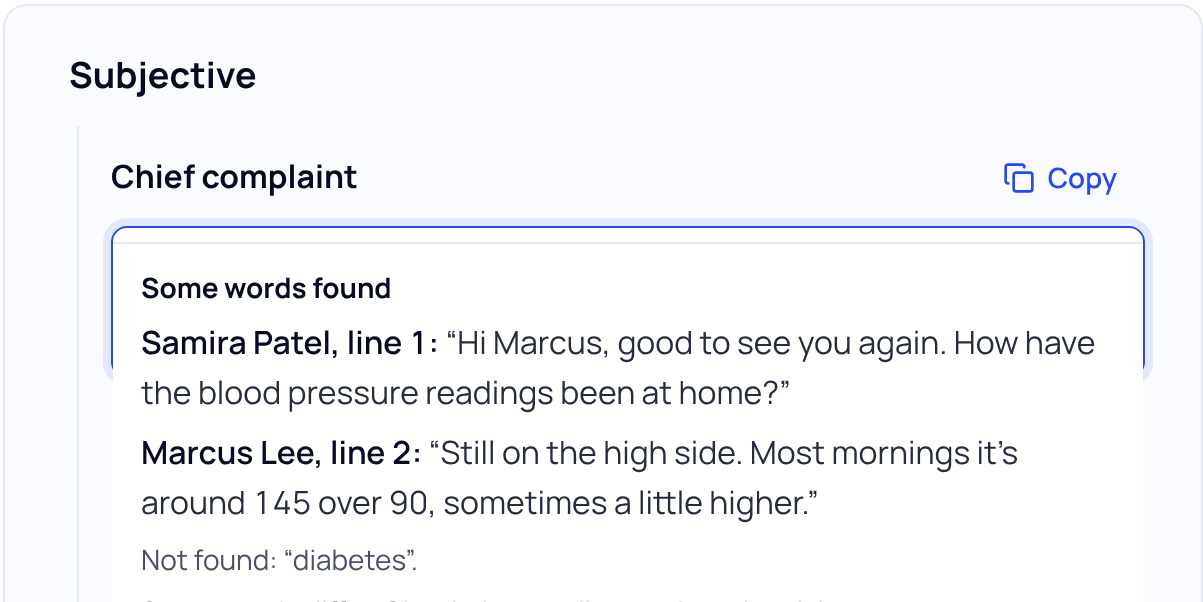
Sources match words, not meaning. Check numbers, sides (left and right) and who said what yourself.
Lines with a dotted underline, such as Not stated in this visit. or [unclear], mark what the visit didn’t cover or the audio didn’t catch. Fill them in or delete them.
Tell us about it
If SOAPsuds wrote something that wasn’t said, we want to know. Use the form on Support (topic Recording and transcription), or email support@soapsuds.io or call +1 (703) 496 3202. Say what kind of mistake it was and the date and time of the visit. Don’t include the patient’s name or other details.
Did this answer your question?
Still need help?
Email support@soapsuds.io or send us a message. Please don't include patient names or details; the visit date and time is enough for us to find it.

