
When to pause
- You step out of the room, or someone comes in who is not part of the visit.
- The patient asks you to stop recording for a moment.
- A part of the conversation should not be in the note.
How it works
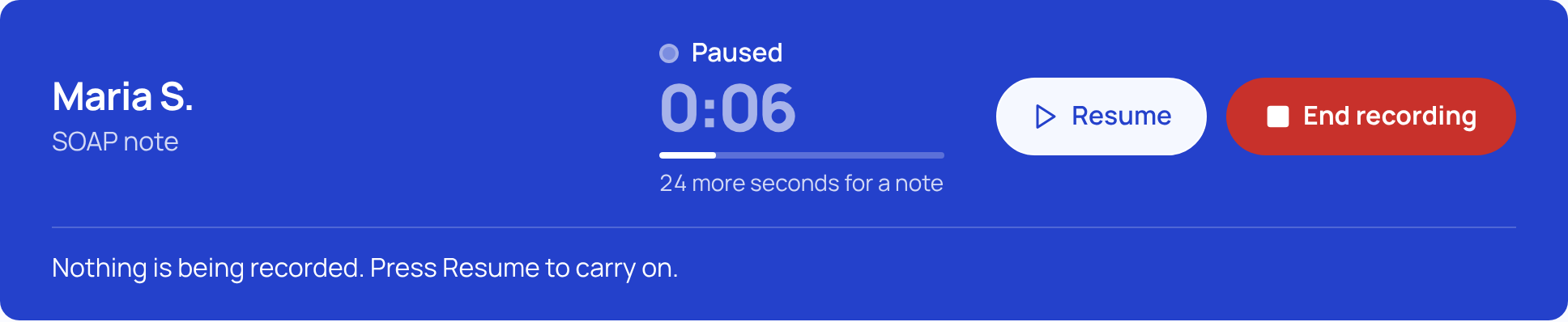
- Press Pause. The status changes to "Paused", the clock stops and dims, and the bar says "Nothing is being recorded. Press Resume to carry on."
- Press Resume. Recording carries on in the same visit and the clock continues.
- Press End recording when the visit is over. Only then is the visit uploaded and the note written, from everything recorded before and after the pause.
Good to know
- While paused, the live transcript says "Paused. Words appear here again when you resume."
- You can still type in Your notes while paused.
- A pause is not the end of the visit. If you leave the page instead of pressing End, SOAPsuds asks first, and a visit that is not uploading is discarded.
- If you lose your connection while paused, the bar says "No connection. Recording is paused."
The 30-second minimum for a note counts recorded time only, not time spent paused.
Did this answer your question?
Still need help?
Email support@soapsuds.io or send us a message. Please don't include patient names or details; the visit date and time is enough for us to find it.

