
Download or print
- Open the visit. The note opens on the Note tab.
- Press Export. It’s beside Copy full note, above the note.
- Choose what you need. Download PDF, Download Word file or Print. A short message tells you when the file is in your downloads.
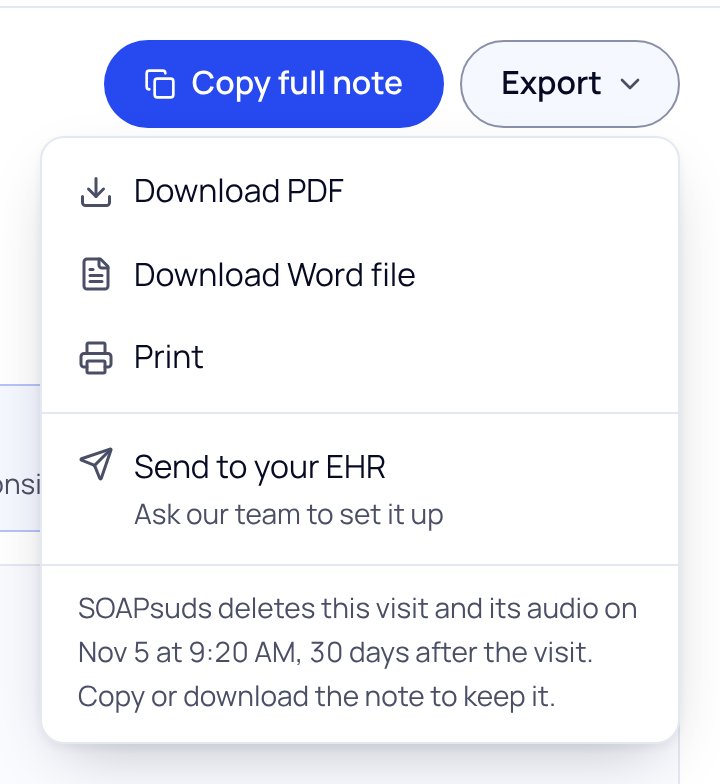
| Option | What you get |
|---|---|
| Download PDF | A PDF of the note, to upload or attach in your EHR. |
| Download Word file | A Word file you can still edit. Word and Google Docs both open it. |
| The note opens in a new tab, laid out for paper. If your browser blocks the new tab, use Download PDF and print the file. | |
| Send to your EHR | A request to our team to set up sending notes to your EHR. It doesn’t send this note. |
What the file contains
- The note, in your template’s order. Sections the visit didn’t cover are left out.
- Patient instructions and the visit summary, after the note under “Also from this visit”.
- Until you sign the note, “Draft. Not signed.” at the top of every page.
- The file is named after the patient and the visit date and time.
The confidential teen section is never in a PDF, Word file or printout, so a parent can’t see it through the patient portal. Copy it on its own from its card under the note.
Ask about sending notes to your EHR
Choose Send to your EHR, pick your EHR from the list (or type its name), add your practice name or how many clinicians would use it, and press Send request. Our team will email you. Please leave out patient details.
SOAPsuds deletes each visit, with its audio, transcript and note, 30 days after the visit time. Download or copy the note before then if you need to keep it.
Did this answer your question?
Still need help?
Email support@soapsuds.io or send us a message. Please don't include patient names or details; the visit date and time is enough for us to find it.

